
Picnik Online Photo Editor
Picnik online photo editor was a widely loved web-based image editing service, known for being intuitive, fast, and easy to use for everyday photo touch-ups.
Here is the story of Picnik, why it closed, and the best alternatives you can use today.

Starting Picnik…
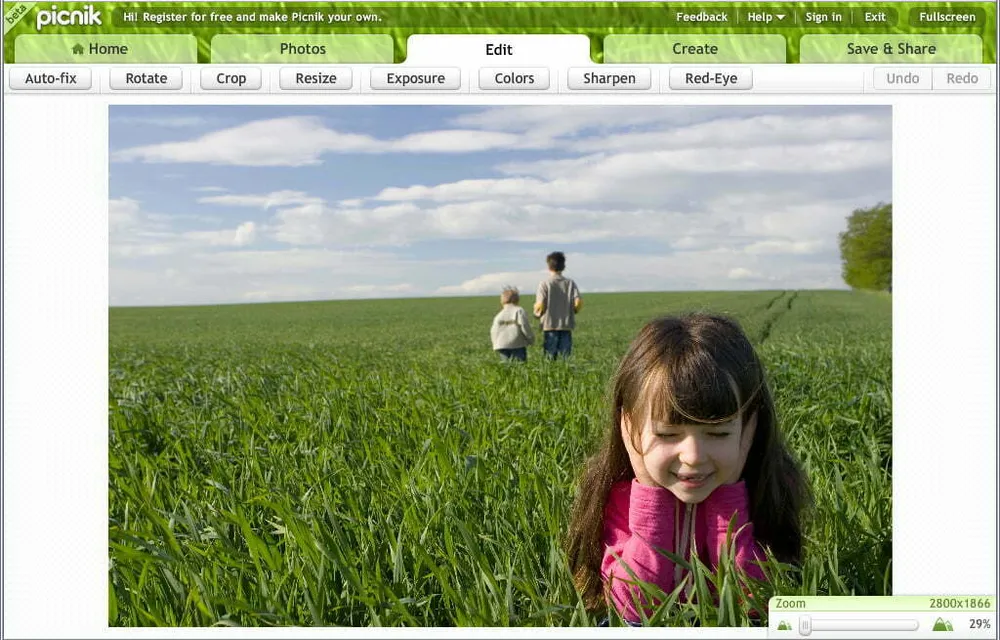
What is Picnik?
Picnik was an online image editing service that was bought by Google in 2010, with headquarters in Downtown Seattle, Washington, United States. It was co-founded by Darrin Massena and Mike Harrington. Mostly popular among entrepreneurs and small business owners, the site was known to be intuitive and easy to use. You could edit your photos with the help of a basic range of tools such as resizing and cropping. One of the best features of Picnik was the ability to import pictures from other websites like MySpace, Facebook, Flickr, Yahoo image search, Picasa Web Albums, Google+, and from your device.
While many of Picnik's basic editing tools were free, there was also a premium option. If users subscribed to a monthly, six-month, or annual Picnik subscription, they gained access to additional photo editing features. Flickr users also had access to Picnik as its default photo editor with limited features, courtesy of the partnership. Picnik also worked with the free website creator Webs to handle photo editing.
Key Features of Picnik
Basic Editing Tools
Resize, crop, and apply quick adjustments to your photos with a simple, beginner-friendly interface.
Import From Anywhere
Pull pictures directly from Facebook, Flickr, Picasa Web Albums, Yahoo image search, MySpace, Google+, or your device.
Special Effects
Add creative effects and enhancements that later lived on inside the Google+ Creative Kit.
Easy to Use
Designed for entrepreneurs, small business owners, and everyday users who wanted fast results without a learning curve.
Free & Premium Options
Many tools were free, with monthly, six-month, or annual subscriptions unlocking extra editing features.
Flickr Integration
Served as the default photo editor inside Flickr through their partnership, plus integration with the Webs site builder.
How to Use Picnik
Choose a Photo Editor
Since the original Picnik service has been discontinued, pick a modern Picnik alternative such as Photoshop Express, Pixlr, FotoFlexer, PicMonkey, or BeFunky.
Import Your Image
Upload a photo from your device or import it from a connected service, just as Picnik allowed imports from Facebook, Flickr, and more.
Edit and Enhance
Use basic tools to resize and crop, then apply effects, filters, text, and frames to get the look you want.
Save and Export
Download your finished image to your device or export it to share online, the same way Picnik users saved files with Takeout.
Why is the Picnik Photo Editing Site Over?
There is really only one answer to why Picnik shut down: Google. As mentioned, Google acquired Picnik back in 2010, and in 2012 it was rolled into Google+. Google had ventured out from simply being a search engine, and Google+ was one of those ventures. Their acquisition of Picnik, an already popular photo editing website, was the brand's attempt to attract more people into using Google+.
The photo editing features and special effects of Picnik became available in the Creative Kit of Google+. However, incorporating these features proved to be an unpopular choice among regular users of online image editing websites. Instead of being a simple stand-alone site that users could easily access, it became more challenging to use. Users needed to log into their Gmail accounts, which could get complicated if someone used more than one account. This lack of ease of use forced many users to switch to different photo editing services.
Google made the announcement months before closing down the site. All premium features were made free for all users for the remaining months as a parting gift. Users who had paid in advance were reimbursed, and an export feature named Takeout was created so people could save all their files from Picnik.
5 Top Picnik Alternatives Online Photo Editor Websites
Now that you know why Picnik discontinued its services, there is no need to be disheartened. We have listed five alternatives to Picnik that will provide you with a similar level of service.
- Photoshop Express – Adobe's free Photoshop Express alternative offers all the basic editing tools plus advanced features like sharpen, exposure, and fill light. You can get creative and add text, bubbles, frames, and different filter frames.
- Pixlr Express – Pixlr Express is the basic version of Pixlr Editor by Autodesk. On top of the basics, it offers some interesting effects, borders, and overlays.
- FotoFlexer – Probably the closest to Picnik in terms of ease of use, FotoFlexer has many fun editing features, from effects to decorations.
- PicMonkey – If you want to get creative but still produce classy images, PicMonkey is a great choice.
- BeFunky – Another easy-to-use editing website, BeFunky offers all the basic photo editing tools plus advanced features like background removal, portrait retouching, and collage makers.
Picnik FAQs
Picnik was an easy-to-use online photo editing service founded by Darrin Massena and Mike Harrington and acquired by Google in 2010. It let users resize, crop, and enhance photos and import images from sites like Facebook, Flickr, and Picasa.
Google acquired Picnik in 2010 and rolled it into Google+ in 2012. Its features moved into the Google+ Creative Kit, which proved unpopular, and the standalone Picnik site was closed.
Many of Picnik's basic editing tools were free, while a premium subscription (monthly, six-month, or annual) unlocked additional photo editing features. Before shutdown, all premium features were made free as a parting gift.
Popular free Picnik alternatives include Photoshop Express, Pixlr Express, FotoFlexer, PicMonkey, and BeFunky, all of which offer similar easy online photo editing.
When Picnik closed, Google created an export feature called Takeout so users could download and save all of their files before the service was discontinued.











